Best Wedding Planning Apps in 2026: What to Use and Skip
Wedding planning in 2026 has a new problem: not a lack of apps, but too many overlapping “do everything” tools that create more tabs than clarity. The couples who feel the most on top of things usuall


Wedding planning in 2026 has a new problem: not a lack of apps, but too many overlapping “do everything” tools that create more tabs than clarity.
The couples who feel the most on top of things usually do something simple: they pick a small planning stack, assign each tool a single job, and skip anything that adds friction for guests or locks up their data.
Below is a practical guide to the best wedding planning apps in 2026, what each is best at, and what to avoid so your planning stays organized (and your guests actually participate).
The 2026 rule: build a “wedding planning stack,” not an app collection
Before we get into specific apps, decide what you truly need. Most weddings only require four “systems”:
- Home base (tasks, notes, vendor docs, decisions)
- Guest system (guest list, RSVPs, website, invitations)
- Logistics (seating chart, floor plan, day-of timeline distribution)
- Memories (a plan to collect guest photos without chasing people)
When couples struggle, it is usually because two or three tools are trying to do the same job (for example: one checklist app, one spreadsheet checklist, plus a planner’s checklist PDF).
How to choose the best wedding planning apps (a quick scoring checklist)
When you are comparing options, the “best” app is the one that fits your wedding constraints and your guests.
1) Guest friction (this matters more than features)
Anything guests must do repeatedly (RSVP, view details, upload photos) should be zero-effort. In 2026, the baseline expectation is:
- No app install for guests when possible
- No account creation for one-time actions
- Mobile-first pages that work on spotty venue Wi‑Fi
2) Data ownership and portability
Ask: “If we stop using this tool two weeks before the wedding, can we export everything?”
Look for:
- Guest list export (CSV)
- Ability to download your website content (or at least keep it live)
- Downloadable seating charts, timelines, and documents
3) Collaboration reality
If multiple people are involved (partner, planner, parents), you need:
- Shared editing
- Comments or approvals
- A single source of truth for final decisions
4) Monetization model (read between the lines)
Some “free” wedding apps make money by selling ads, prioritizing paid vendors, or generating leads. That is not automatically bad, but it can add noise when you are trying to make clean decisions.
Best wedding planning apps in 2026 (what to use and what to skip)
To keep this useful, the recommendations are organized by the job each tool does best.
Category 1: All-in-one wedding platforms (best for speed and simplicity)
All-in-one platforms are popular because they bundle checklists, vendor discovery, websites, and registries. They are often the fastest path from “engaged” to “organized.”
Zola
Use it for: A streamlined registry plus wedding website experience, especially if you want fewer moving parts.
Skip it if: You already have your registry and website handled elsewhere, and you just need serious project management.
Official site: Zola
The Knot
Use it for: A broad planning hub with lots of templates and a big ecosystem, helpful when you want planning guidance and do not know where to start.
Skip it if: You get decision fatigue easily. Big ecosystems can mean more suggestions than you want.
Official site: The Knot
WeddingWire
Use it for: Vendor discovery and reviews while you are shortlisting.
Skip it if: You want a quiet planning space. Marketplaces can create “infinite scroll” decision loops.
Official site: WeddingWire
How to decide among all-in-ones: If you love the idea of one login and minimal setup, pick one platform and commit. If you prefer custom workflows, you will be happier with a “home base” tool (next section) plus a dedicated RSVP/site tool.
Category 2: Home base planning apps (best for real project management)
This category is the difference between “we have a checklist” and “we actually know what is decided, what is pending, and what is blocked.”
Notion
Use it for: A flexible wedding HQ, tasks, vendor pages, decision logs, packing lists, and a living timeline document.
Skip it if: You do not want to build anything. Notion shines when you enjoy customizing.
Official site: Notion
Trello
Use it for: A simple visual workflow (To do, Doing, Done) that is easy for families and planners to follow.
Skip it if: You want deep documents inside the tool. Trello is best when paired with a shared drive for files.
Official site: Trello
2026 pro tip: Use your home base as the “decision record.” Whenever you lock a vendor, a menu choice, or a ceremony time, write it down in one place. This prevents the classic wedding problem where the correct answer exists in a text thread from three months ago.
Category 3: Spreadsheets (still the best for budgets and guest lists)
Spreadsheets remain unbeatable for budget math, tracking payment schedules, and manipulating guest list data.
Google Sheets
Use it for: Budget tracking, guest list master file, RSVP imports/exports, and quick filtering (vegetarian, plus-ones, kids).
Skip it if: You hate spreadsheets so much that you will avoid updating them. In that case, use an all-in-one platform and keep your budget simple.
Official site: Google Sheets
Why it still wins in 2026: Every vendor and planner can understand a spreadsheet, and you can export it forever.
Category 4: Wedding websites and RSVPs (optimize for guest experience)
Your wedding site and RSVP flow is where guest friction shows up immediately. Prioritize mobile speed, clarity, and minimal steps.
Joy
Use it for: A guest-friendly wedding website and RSVP experience with a clean, modern feel.
Skip it if: You want your registry, planning checklist, and site all tightly integrated in one system.
Official site: Joy
Zola or The Knot (as RSVP + website)
If you already picked an all-in-one platform, using its site and RSVP tools reduces complexity. In many cases, “good and integrated” beats “best-in-class but fragmented.”
Category 5: Seating charts and layouts (best when you have complexity)
If you have a simple seating plan, a spreadsheet and a printable chart can be enough. But if you have a large guest count, a tricky room, or multiple events, a dedicated layout tool can save hours.
AllSeated
Use it for: Visual floor plans and seating arrangements when you need to see the room to make decisions.
Skip it if: Your venue is straightforward and you are comfortable doing seating in a spreadsheet.
Official site: AllSeated
Category 6: Design and signage (best for DIY couples)
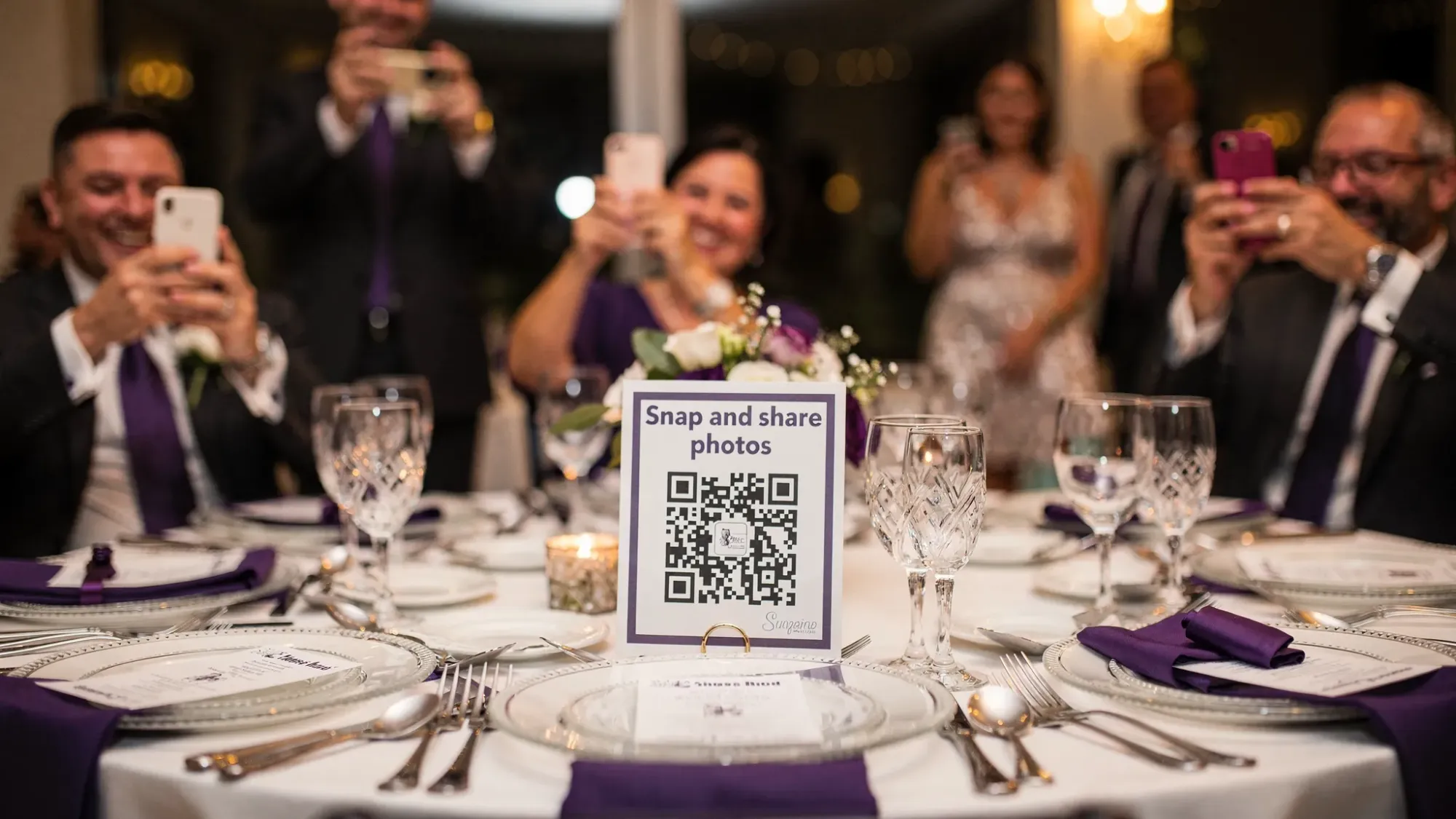
Good signage reduces questions and increases participation in anything you want guests to do (find seats, scan a QR, join a photo moment).
Canva
Use it for: Designing invitations, signage, table cards, and simple day-of prints.
Skip it if: You are working with a stationer who provides a complete design system. Doubling up creates inconsistency.
Official site: Canva

The app most couples forget: a guest photo plan (and why it matters)
Most wedding planning apps help you produce the wedding. Very few help you collect memories from everyone without the post-wedding scramble of:
- “Can you text me that photo?”
- 14 different iCloud links
- a hashtag that half the guests never use
- AirDrop lines at the end of the night
If you care about candid moments from multiple angles, you need a deliberate photo collection workflow.
Revel.cam (best for app-less guest photo capture via QR or NFC)
Revel.cam is designed specifically for events: guests scan a QR code (or tap an NFC tag) to open a shared camera and upload instantly, with no signup and no app install required.
Use it for:
- A private, event-only guest photo gallery
- Instant uploading during the wedding (no chasing later)
- Host controls like guest limits, an end time, and the ability to review photos
- A “gallery reveal” after the Moment ends, if you want a shared morning-after experience
Skip it if: Your crowd truly will not participate in any guest photo plan (for example, a very small wedding where you already have full coverage and guests are not phone-photo people). In most cases, a low-friction QR flow increases participation significantly compared to “send it to us later.”
Learn more or set up a Moment: Revel.cam
What to skip in 2026 (even if it is popular)
“Skip” does not mean a tool is bad. It means it is likely to create drag for your specific goal of planning efficiently.
Skip #1: Anything that requires guests to download an app to participate
If participation matters (RSVP completion, photo sharing, schedule updates), avoid forcing guests into an app install. Every extra step drops engagement, especially for older relatives and less techy friends.
Skip #2: Multiple overlapping checklists
A checklist is only helpful if everyone updates the same one. If you have:
- an all-in-one checklist,
- a planner’s checklist,
- and a personal checklist in Notes,
you will feel busy without feeling done.
Pick one system as the source of truth, then link out to documents as needed.
Skip #3: Vendor marketplaces as your “home base”
Marketplaces can be great for discovery. They are not always great for executing your plan. Once you shortlist vendors, move key details into your home base (Notion, Trello, or your chosen platform) so your planning is not driven by browsing.
Skip #4: Tools that will not export your guest list
Guest list data is the backbone of invitations, RSVPs, seating, meals, and thank-you notes. If you cannot export it cleanly, you are taking on risk.
A simple “best wedding planning apps” setup for most couples (copy this)
If you want a low-stress default stack that works for a wide range of weddings, use this as a starting point:
Option A: One-platform approach (maximum simplicity)
Choose one all-in-one platform (Zola or The Knot), then keep:
- Google Sheets for your budget (optional, but helpful)
- Revel.cam for guest photo collection
This reduces decision fatigue.
Option B: Custom approach (maximum control)
- Notion or Trello as the home base
- Joy for website + RSVPs
- Google Sheets for budget + guest list master
- AllSeated only if you need a true layout tool
- Revel.cam for guest photos
This gives you flexibility without chaos.
Quick comparison table
| Wedding planning need | Best type of app/tool | Use it when | Skip it when |
|---|---|---|---|
| Planning HQ (tasks, notes, decisions) | Notion or Trello | You want real project management | You want everything pre-built |
| Website + RSVPs | Joy, Zola, or The Knot | Guest experience is a priority | You are doing paper RSVPs only |
| Budget + guest list master | Google Sheets | You want portability and filters | You will not maintain it |
| Seating + layouts | AllSeated | Large or complex layouts | Simple seating chart is enough |
| Guest photo collection | Revel.cam | You want candid photos without chasing | Guests truly will not participate |
Frequently Asked Questions
What are the best wedding planning apps in 2026 for most couples? A strong default is an all-in-one platform (Zola or The Knot) plus Google Sheets for budget tracking. Add a dedicated guest photo plan like Revel.cam so memories do not end up scattered across texts and shared albums.
Should I use Zola or The Knot? Use the one whose website, RSVP flow, and registry experience you prefer. In practice, committing to one platform usually beats splitting your planning across two similar ecosystems.
Is a spreadsheet really necessary for wedding planning? Not always, but it is still the most reliable way to manage budget math and a master guest list, especially when you need filtering (meal choices, plus-ones) and clean exports.
How can I collect wedding guest photos without making everyone download an app? Use a QR-based flow that opens instantly on guests’ phones. Revel.cam lets guests scan a QR code (or tap an NFC tag) to take and upload photos with no signup or app install.
What should I avoid when choosing wedding planning apps? Avoid overlapping checklists, tools that lock your guest list, and any guest-facing workflow that requires multiple steps (like mandatory app downloads or account creation).
Make your wedding planning apps actually deliver the memories
Even the best wedding planning apps rarely solve the post-wedding photo chaos. If you want candid guest photos in one private place, without chasing texts or links, set up a Revel.cam Moment and share it via QR code at your events.
Create your Moment in minutes at Revel.cam.